Segments
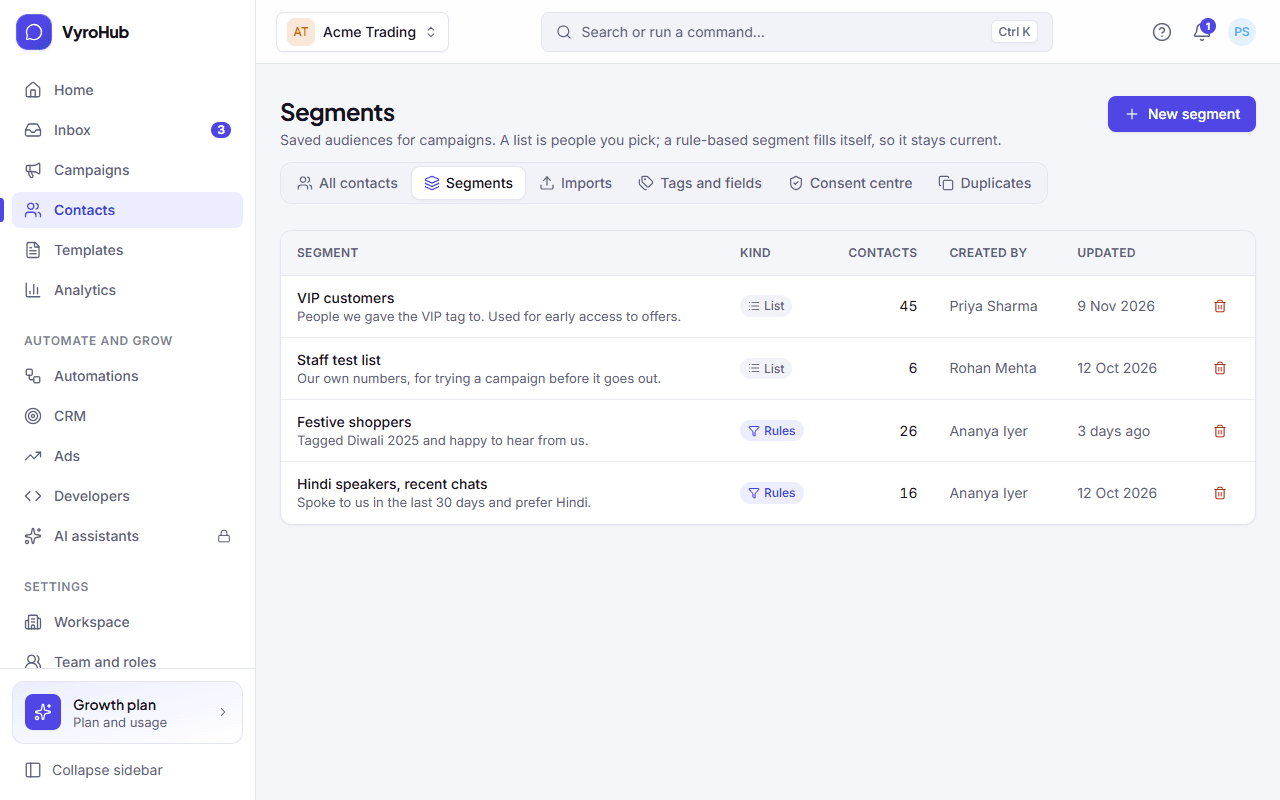
Save an audience once and reuse it in every campaign, as a list you pick or as a segment that fills itself from rules.
PartialWorks, but a part is missing or not switched on yet. The page says which part.
Last reviewed against the app on
A segment is a saved audience, like "VIP customers" or "People who wrote to us this month". You pick it as the audience when you create a campaign.
What's partial: segments that fill themselves are only available when your plan includes them; otherwise the option is greyed out and names the plan that has it. The rule "Replied to a campaign" is not available yet.
Who can do this: Owner, Admin, Manager
Everyone who can see contacts can see segments. Only editors can change a segment's rules or members.
Two kinds of segment
| A list I pick | A segment that fills itself | |
|---|---|---|
| Shown as | List | Rules |
| Who is in it | The people you add. | Everyone who matches your rules, right now. |
| Stays current | Only when you add or remove people. | By itself: people join and leave as they match. |
| Add people | From the segment's page, or by ticking contacts on the Contacts page. | You don't: change the rules instead. |
| Good for | A guest list, a hand-picked group. | "VIP in Mumbai", "No message in 90 days". |
Permission is checked again when you send
Being in a segment doesn't mean someone can get marketing. When a campaign is sent, everyone is checked again: people who haven't agreed, or who asked not to be messaged, are left out automatically and counted for you.
Create a list
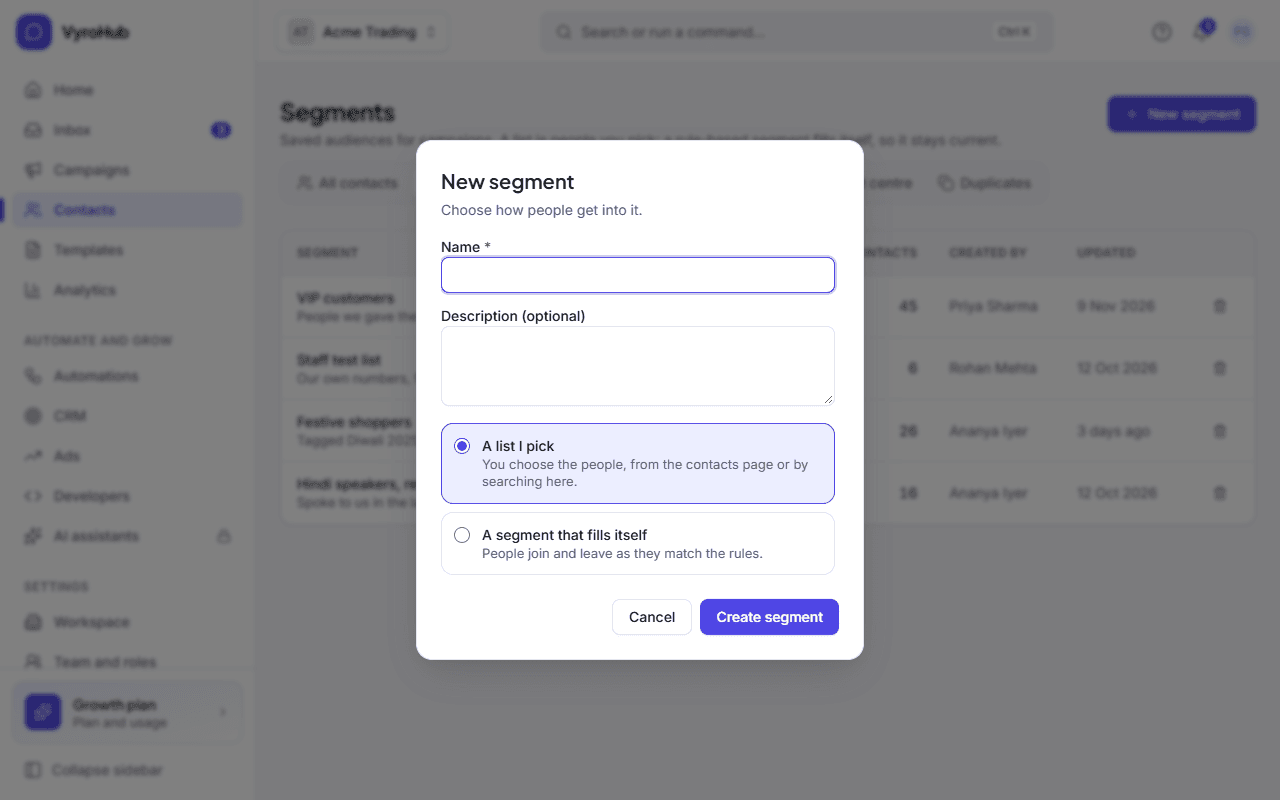
Go to Contacts → Segments and choose New segment.
Enter a name (up to 80 characters) and an optional description (up to 300).
Choose A list I pick and Create segment. Its page opens.
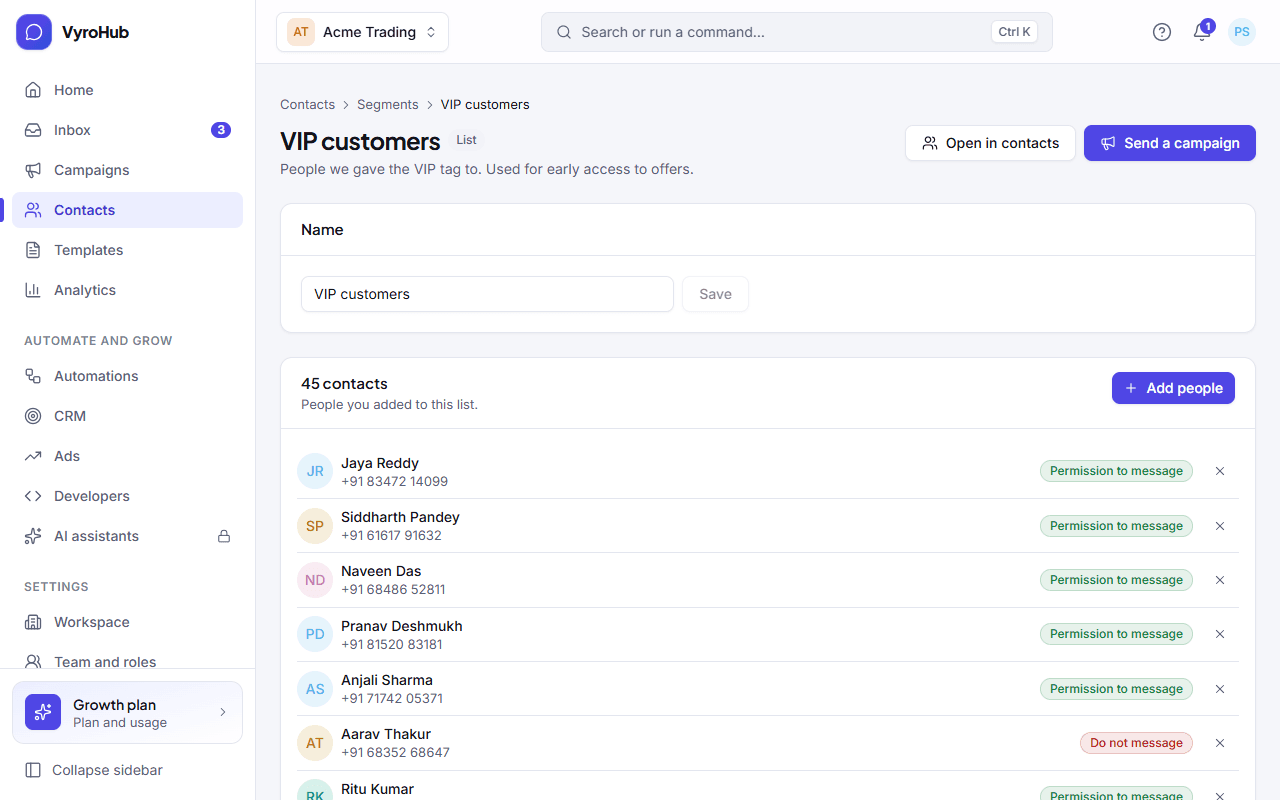
Choose Add people, search, tick the people, and choose Add N people.
You can also add people from the Contacts page: tick them, choose Add to segment, and pick the list. Only lists appear there; segments that fill themselves aren't listed, because their members come from the rules.
Create a segment that fills itself
Choose New segment, enter a name, and choose A segment that fills itself.
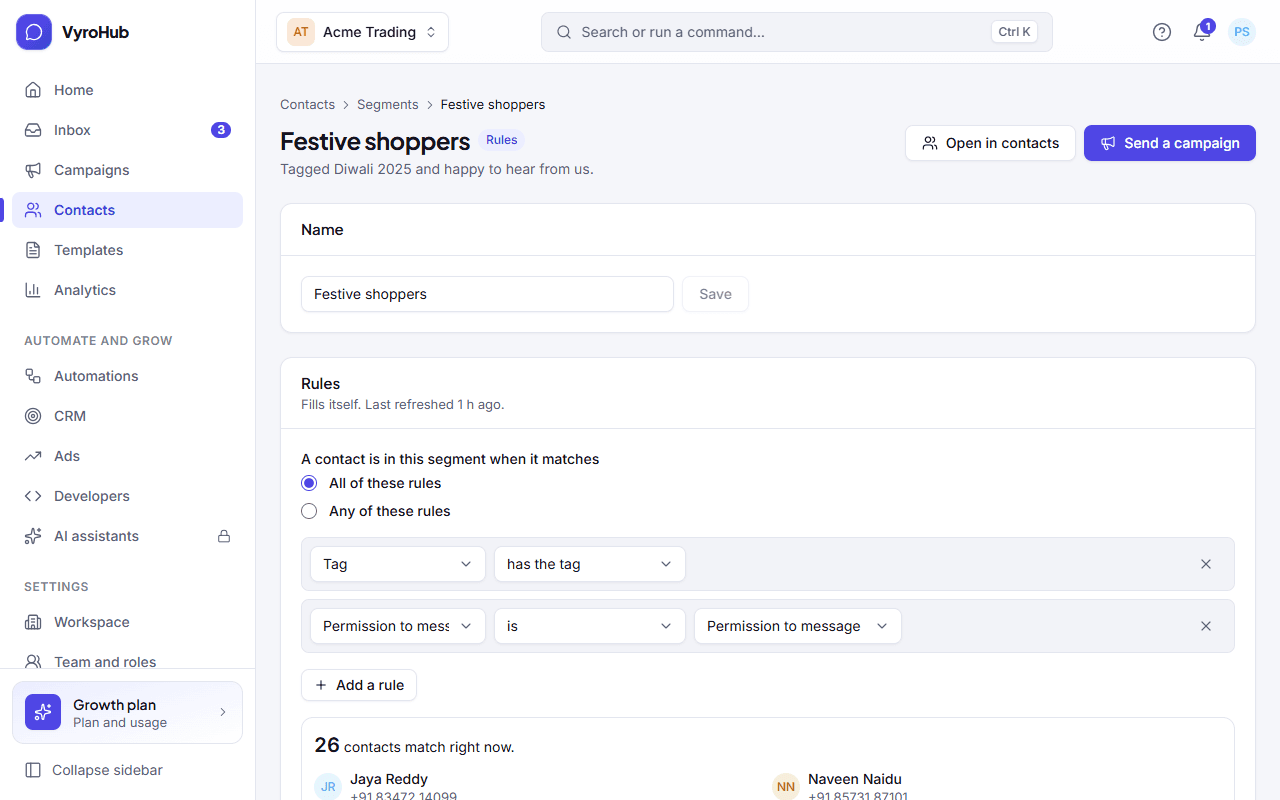
Under A contact is in this segment when it matches, choose All of these rules (every rule must match) or Any of these rules (one is enough).
Add rules. Each rule is what to look at, a condition and usually a value. See the table below.
Watch the preview: "N contacts match right now", with a few examples.
Choose Create segment.
Every rule you can use
| Look at | Conditions | Value | Example |
|---|---|---|---|
| Tag | has the tag, doesn't have the tag | A tag | has the tag VIP |
| Custom field | is, is not, contains, is more than, is less than, has a value, is empty | Depends on the field | Loyalty points is more than 1000 |
| Permission to message | is, is not | Permission to message, Do not message, No permission recorded | Permission to message is not Do not message |
| Last message | was within the last, was more than | A number of days | Last message was more than 90 days |
| Added | was within the last, was more than | A number of days | Added was within the last 30 days |
| Where they came from | is, is not | Added by hand, Imported, Messaged us on WhatsApp, Our website or app, WhatsApp ad, Replied to a campaign | Where they came from is Imported |
| Language | is, is not | A language | Language is Hindi |
| City | is, contains, is not | Text | City is Mumbai |
Which custom field conditions work depends on the field's kind:
| Field kind | Conditions you can use |
|---|---|
| Text | is, is not, contains, has a value, is empty |
| One of a list | is, is not, contains, has a value, is empty |
| Number | is, is not, is more than, is less than, has a value, is empty |
| Date | is, is not, is more than (later than), is less than (earlier than), has a value, is empty |
| Yes or no | is, is not, has a value, is empty |
Worked examples
| Audience you want | Match | Rules |
|---|---|---|
| VIP customers in Mumbai | All | Tag has the tag VIP · City is Mumbai |
| People to win back | All | Last message was more than 90 days · Permission to message is Permission to message |
| New this month, from a WhatsApp ad | All | Added was within the last 30 days · Where they came from is WhatsApp ad |
| Wholesale or big spenders | Any | Tag has the tag Wholesale · Loyalty points is more than 5000 |
Use and manage a segment
From a segment's page:
| Action | What it does |
|---|---|
| Open in contacts | Shows its members on the Contacts page, with all the usual filters. |
| Send a campaign | Starts a new campaign with this segment as the audience. |
| Name → Save | Renames it. |
| Rules → Save rules | Changes the rules of a segment that fills itself. Members update straight away. "Last refreshed" shows when it was last worked out. |
| Remove (×) next to a person | Takes them off a list. |
| Delete (on the Segments page) | Removes the segment. The contacts in it stay, and campaigns already sent are not affected. A campaign that is still a draft and uses it will need another audience. |
When it works
The Segments page lists each segment with its kind (List or Rules), its number of contacts, who created it and when it was updated. A segment's page shows its members with their permission state.
When something goes wrong
| What you see | Why | What to do |
|---|---|---|
| "Give the segment a name." | The name is empty. | Enter a name. |
| "Add at least one rule." | A segment that fills itself has no rules. | Add a rule. |
| "A segment can have at most 20 rules." | Too many rules. | Combine rules, or split into two segments. |
| "Choose a custom field that exists." | The custom field was deleted. | Pick another field, or remove the rule. |
| "That condition doesn't fit this kind of field." | For example "contains" on a Number field. | Use a condition from the table above. |
| "Use a number of days from 1 to 3650." | The days value is out of range. | Enter 1 to 3650. |
| "Included in the … plan and above." (option greyed out) | Your plan doesn't include segments that fill themselves. | Use a list, or ask the Owner about the plan. |
| "We couldn't count who matches right now." | The preview failed. | Check the rules; try again. |
| "Nobody here yet" / "No contact matches these rules right now." | The segment is empty. | Add people, or loosen the rules. |
| "You have no static lists yet." (when adding from Contacts) | No list exists. | Create a list first under Segments. |
| A rule about a deleted tag | The tag no longer exists. | That rule simply stops matching; nobody is messaged because of it. Edit the rule. |
Limits
| Limit | Value | Set by |
|---|---|---|
| Segments in a workspace | 200 | VyroHub |
| Rules in one segment | 20 | VyroHub |
| People in one list | 100,000 | VyroHub |
| Days in a "within" or "more than" rule | 1 to 3,650 | VyroHub |
| A text value in a rule | 120 characters | VyroHub |
| Segment name | 80 characters | VyroHub |
Find people by whether they replied to a particular campaign. The rule exists in the list of planned rules but can't be used yet.