Permission and do not message
How permission to message works, how to record it with proof, how opt-outs are honoured, and how to use the consent centre.
ImplementedWorks in the app today, as this page describes.
Last reviewed against the app on
WhatsApp requires that you only send marketing to people who agreed to receive it, and that you stop the moment someone asks. VyroHub keeps a record of both and checks them every time a message is sent, even for a campaign that is already running.
Who can do this: Everyone can view permission and record a do-not-message request
Recording permission and editing the wording library need Owner, Admin or Manager. Anyone may honour an opt-out.
The rules VyroHub follows
| Rule | What it means for you |
|---|---|
| Permission is per kind of message | Marketing (offers, promotions and news), Updates (orders and account: order confirmations, delivery updates, account alerts) and One-time codes (login and verification codes) each have their own permission. |
| Writing to you is not permission for marketing | When someone writes first, you can reply for 24 hours. That never counts as agreeing to marketing. |
| Do not message always wins | A request to stop beats any permission recorded before it. |
| Opt-outs count straight away | Whether the person replied STOP, turned off marketing in their WhatsApp settings, or told a teammate. They are left out of every campaign at once, including running ones. |
| The newest record speaks | For each kind of message, the most recent record decides. |
| Only a fresh "yes" lifts a "stop" | Permission recorded with a date after their request, from the person themselves, lifts it. An import never can. |
| Nothing is deleted | Every permission and opt-out is kept, so you can always show when and how someone agreed. |
Record permission to message
Open the contact and choose Record permission to message…
Answer each question. Only record what the person actually told you: this is kept as proof if WhatsApp or the person ever asks.
| Question | Choices |
|---|---|
| What did they agree to? | Marketing, Updates (orders and account), or One-time codes |
| Where did they agree? | Website form, In person or on paper, Reply to a text message, Phone call (IVR), WhatsApp button, Ad lead form, Other |
| When did they agree? | A date in the past, or today |
| Wording they saw | The sentence they agreed to, from your wording library. It must name your business. |
| Reference (optional) | A form number, recording or scan, so you can find the proof later |
Save. You see "Permission recorded".
Stop messaging someone (do not message)
Open the contact and choose Do not message… (or, in the consent centre, Add someone to the do-not-message list).
Optionally give a reason, for example "asked on a phone call".
Leave Also stop order and account updates off unless they asked for no messages at all. Off: only marketing stops. On: every kind of message stops.
Confirm. They are left out of every campaign straight away, including ones already running.
A customer can also do this themselves by replying with a stop word.
The consent centre
Go to Contacts → Consent centre. It's your proof that you only message people who agreed.
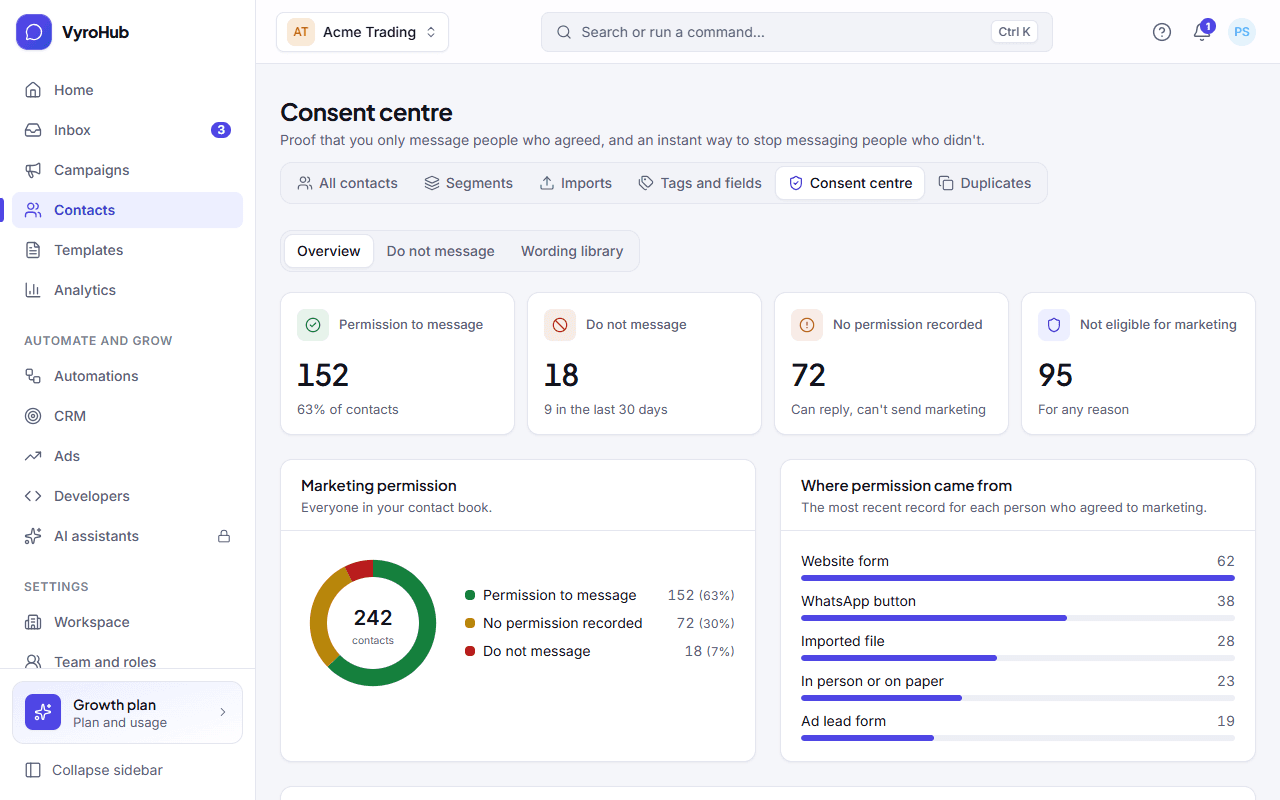
| Part | What it shows |
|---|---|
| Figures | Permission to message (and the share of contacts), Do not message (and how many in the last 30 days), No permission recorded, Not eligible for marketing. |
| Where permission came from | The most recent record for each person who agreed to marketing, grouped by source. |
| By kind of message | Permission for Marketing, Updates and One-time codes. |
| Do-not-message list | Everyone who asked to stop, with how we found out: Replied STOP on WhatsApp, Turned off marketing in WhatsApp, A teammate recorded it, Imported file, WhatsApp would not deliver marketing to them, Our website or app, Other. Search it, filter it, or Add someone. |
| Wording library | The exact sentences people agree to. |
The wording library
Every permission you record points at the version of the wording the person saw, so you can always show what they agreed to.
In the consent centre, under Wording library, choose Add wording.
Give it a name, and write the full sentence people agree to. It must name your business and say how to stop, for example: "Yes, Sharma Stores may send me order updates and offers on WhatsApp. I can reply STOP at any time to stop."
Save. Editing it later creates a new version: permissions already recorded keep the version they were given under.
A wording can be deleted only while nothing uses it. Once a permission points at it, it has to stay; edit it to make a new version instead.
When it works
The contact's Where they stand shows the new state for that kind of message, and Permission history shows the new record with its source, date and wording.
When something goes wrong
| What you see | Why | What to do |
|---|---|---|
| "Recorded, but marketing stays off" | The person asked not to be messaged after the date you entered, and a later request always wins. | Only if they agreed again: record it with a date after their request. |
| "Give the wording a name." / "Write the full sentence the person agrees to." | A field is empty. | Fill it in. |
| "It must name your business (…)" | The wording doesn't say who they're agreeing to hear from. | Add your business name. |
| "… permission records point at it, so it has to stay." | You tried to delete a wording in use. | Edit it to create a new version instead. |
| "Couldn't record that. Try again." | A short connection problem. | Try again. |
Limits
| Limit | Value | Set by |
|---|---|---|
| Permission date | Today or earlier | VyroHub |
| Lifting a do-not-message request | Only a newer permission from the person, never an import | WhatsApp's rules |
| When an opt-out takes effect | Immediately, including running campaigns | WhatsApp's rules |