Duplicates
Find people saved more than once, merge them into one contact, and undo a merge.
ImplementedWorks in the app today, as this page describes.
Last reviewed against the app on
When the same person is saved twice, their messages and permission are split across two contacts. Merging joins them back into one.
Who can do this: Everyone who can edit contacts (all four roles)
Steps
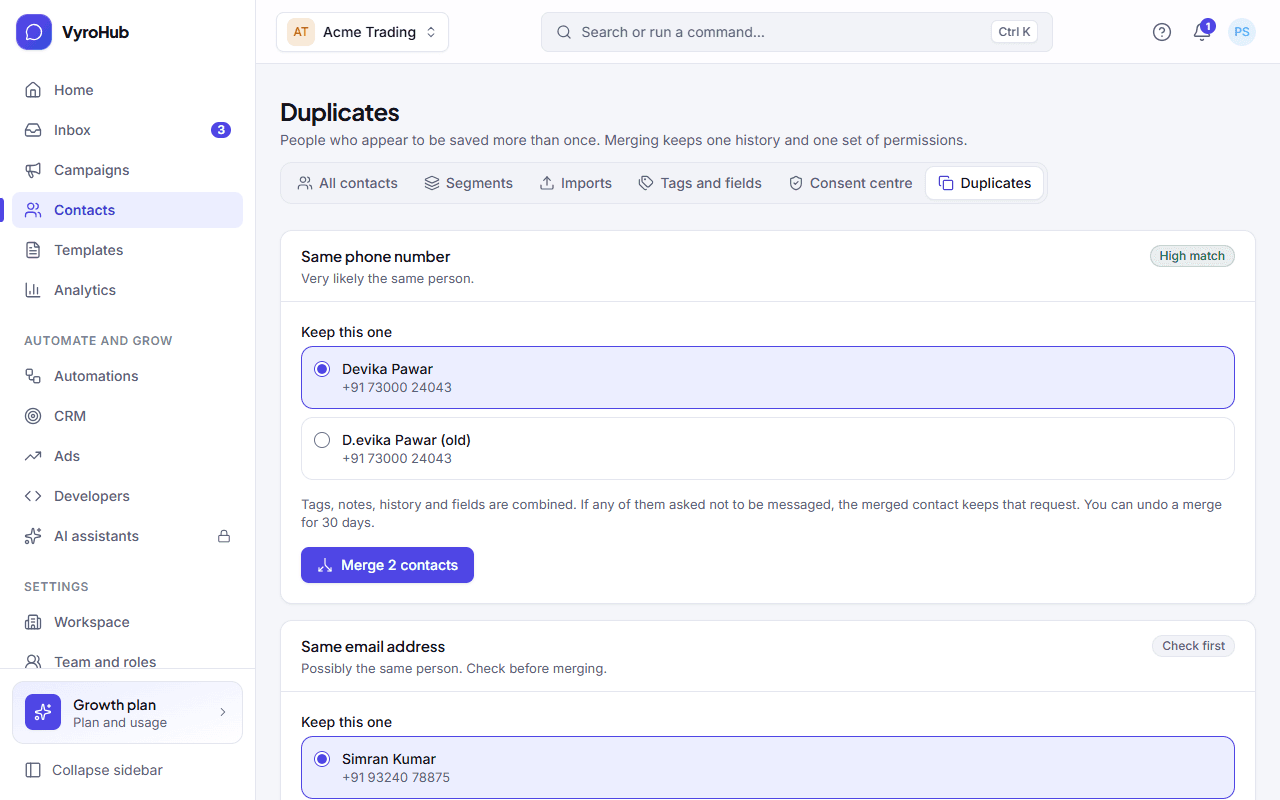
Go to Contacts → Duplicates. VyroHub groups people who appear to be the same.
Read why each group was matched:
| Match | Shown as | Meaning |
|---|---|---|
| Same phone number | High match | Very likely the same person. |
| Same email address | High match | Very likely the same person. |
| Similar name | Check first | Possibly the same person. Check before merging. |
Choose Keep this one on the contact that should stay, then merge.
What a merge does
- Tags, notes, history and custom fields are combined into the contact you kept.
- If any of them asked not to be messaged, the merged contact keeps that request.
- You see "Merged into …", with an Undo option.
When it works
The group disappears from the list. When nothing is left you see "No duplicates found: Every contact looks like a different person." The list stays up to date as you add people.
Undo a merge
Choose Undo after merging, within 30 days. You see "Merge undone".
When something goes wrong
| What you see | Why | What to do |
|---|---|---|
| "Couldn't merge" | A short connection problem, or one of the contacts changed. | Reload and try again. |
| "Couldn't undo" | The 30 days have passed, or the contact changed since. | Fix the contacts by hand. |
| "We couldn't look for duplicates" | A short connection problem. | Reload the page. |
| "You can't merge contacts" | Your access to edit contacts was removed. | Ask an Owner or Admin. |
Limits
| Limit | Value | Set by |
|---|---|---|
| Contacts in one merge | 10 | VyroHub |
| Time to undo a merge | 30 days | VyroHub |