Contacts
Your contact book, how permission to message works, and how to find, filter and organise people.
ImplementedWorks in the app today, as this page describes.
Last reviewed against the app on
Contacts is everyone you can message, with the permission each person gave. Marketing messages only ever go to people who agreed to receive them, and VyroHub checks that every time a message is sent.
Who can do this: Everyone can view, add and edit contacts
Importing needs Owner, Admin or Manager. Deleting, exporting and erasing need Owner or Admin. An Agent sees phone numbers partly hidden unless the workspace shows them in full.
Three ideas to know
1. One person, one contact
A contact is found by their mobile number, their WhatsApp number or their WhatsApp username. Duplicates can be merged.
2. Permission per kind of message
Marketing, Updates (orders and account) and One-time codes each have their own permission, with where and when it was given.
3. Do not message always wins
A request to stop beats any earlier permission, straight away, even for a campaign that is already running.
The contacts page
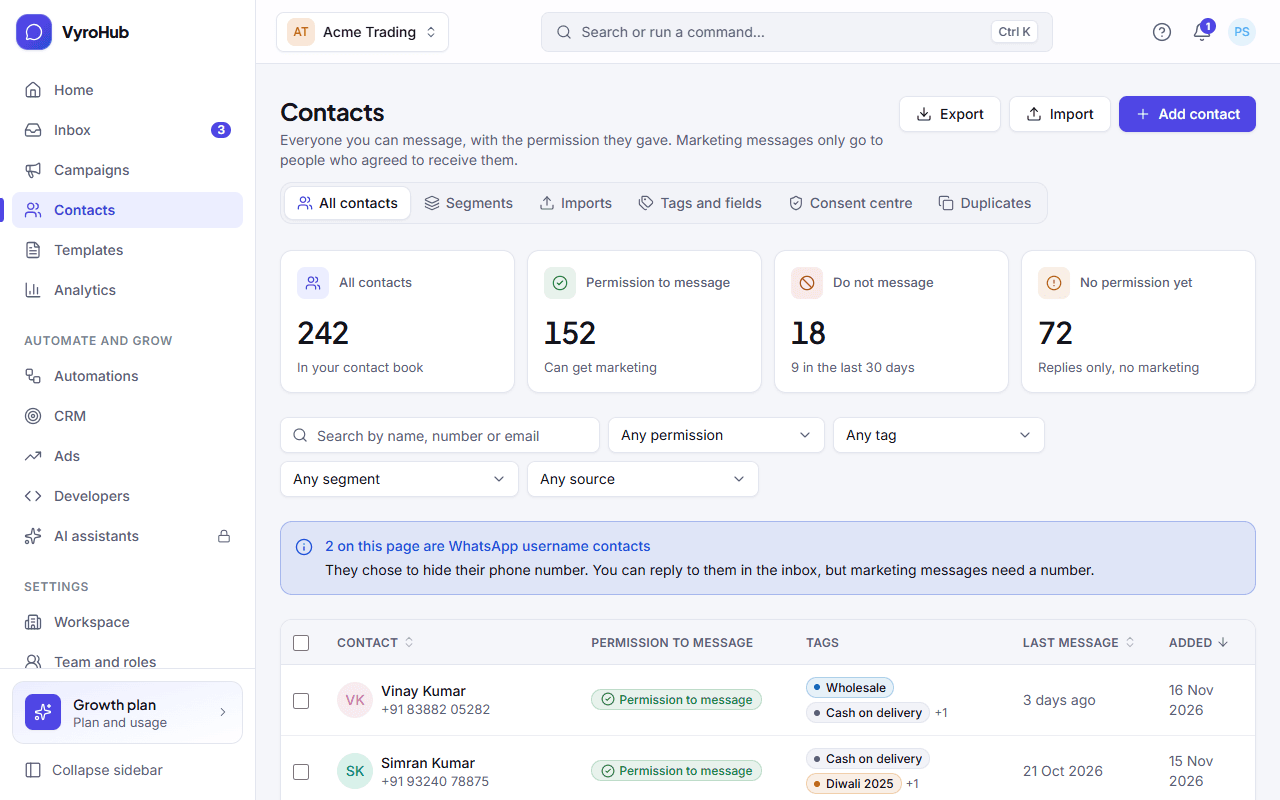
| Part | What it does |
|---|---|
| Figures at the top | All contacts, how many gave Permission to message, how many are on Do not message (and how many joined it in the last 30 days), and how many have No permission yet. |
| Search | By name, number or email. |
| Filters | Permission (Permission to message, Do not message, No permission recorded, Not eligible for marketing), tag, segment and source. Clear filters resets them. |
| Sorting | By name, when added, or last message. |
| Selecting people | Tick contacts to Add a tag, Remove a tag or Add to segment (a list you pick). |
| Buttons | Add contact, Import contacts, Export. |
Where a contact came from is shown as: Added by hand, Imported, Messaged us on WhatsApp, Our website or app, WhatsApp ad, or Replied to a campaign.
WhatsApp username contacts
Some people hide their phone number and use a WhatsApp username. They appear as "WhatsApp username contact" with no number. You can reply to them in the inbox while their 24-hour window is open, but templates and marketing need a phone number, so they can't be in a campaign until they share it. VyroHub never tries to work out the number behind a username.
Guides
Add and edit contacts
Add one person, edit them, delete or erase them.
Import contacts
Bring in a spreadsheet, checked before anything is added.
Tags and custom fields
Label people and keep your own details about them.
Segments
Saved audiences: lists you pick, or groups that fill themselves.
Permission and do not message
Record permission, honour opt-outs, keep the wording people agreed to.
Duplicates
Find and merge people saved twice, and undo a merge.
Export contacts
Download your contact list as a file.