Roles and permissions
The four roles in a workspace, what each one is for, and which conversations and contacts each one can see.
ImplementedWorks in the app today, as this page describes.
Last reviewed against the app on
Everyone in a workspace has one role. Roles are fixed: you can't edit what a role can do, only choose which role each person has. In the app, Settings → Team and roles has a Roles reference you can search.
Who can do this: Owner, Admin change roles
An Admin can't make anyone an Owner, and can't change or remove an Owner. Nobody can give themselves more access than they have.
The four roles
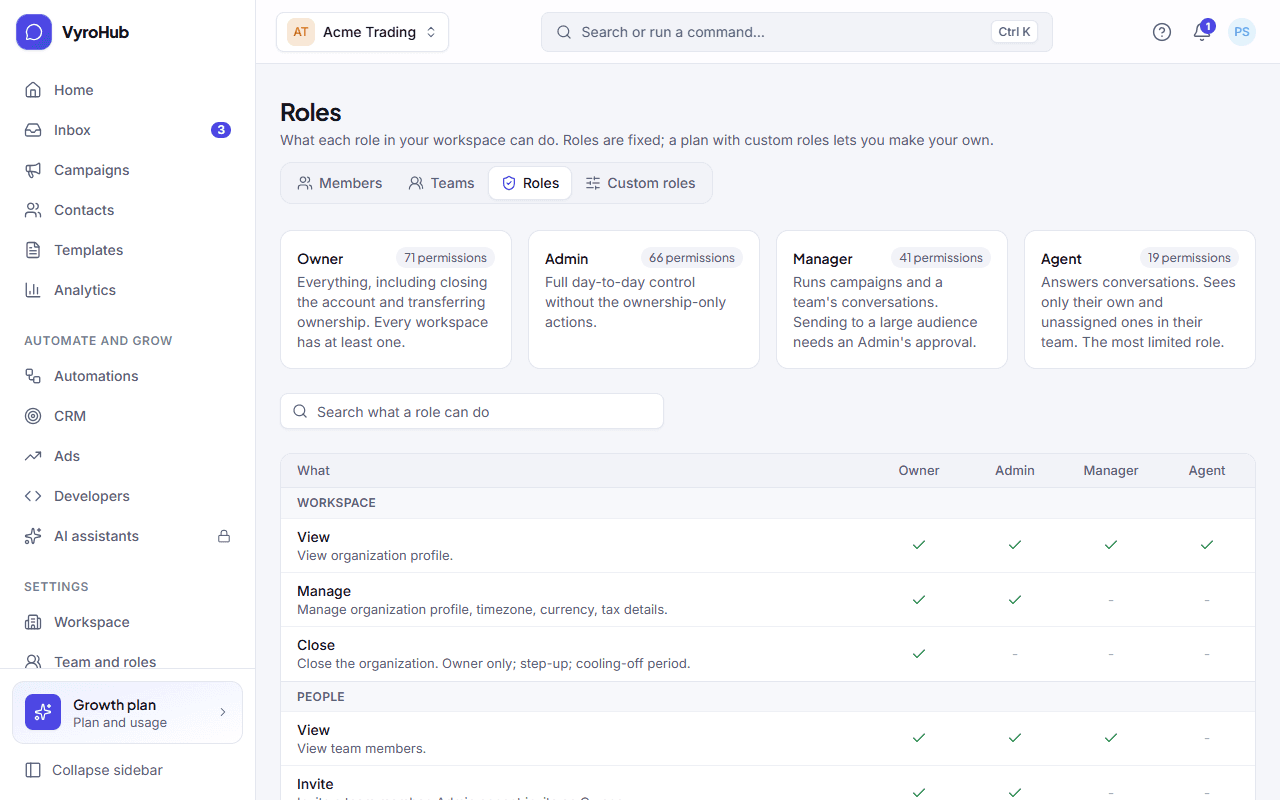
| Role | For | In short |
|---|---|---|
| Owner | The business owner. Every workspace has at least one. | Everything, including billing, closing the workspace and making other Owners. |
| Admin | The person who runs the workspace day to day. | Full day-to-day control, without the Owner-only actions. |
| Manager | A team lead. | Runs campaigns and a team's conversations. Sending to a large audience needs an Admin's approval. |
| Agent | Someone who answers customers. | Answers conversations. Sees only their own and unassigned ones in their team. The most limited role. |
Who sees which conversations
| Role | Sees |
|---|---|
| Owner, Admin | Every conversation. |
| Manager | Their teams' conversations. |
| Agent | Their own conversations, plus the unassigned ones routed to their teams. |
Put people in teams so Managers and Agents see the right conversations.
Other rules
- Two-step verification is required for Owners and Admins.
- An Agent sees phone numbers partly hidden, unless the workspace shows them in full.
- An Agent's figures in Home and Analytics are their own.
- Some actions ask for a fresh code from your authenticator app, whatever your role. See two-step verification.
- Removing someone works straight away: they lose access on their next click, not when their sign-in expires.
Choosing a role
| If the person… | Give them |
|---|---|
| Owns the business and pays for VyroHub | Owner |
| Sets up numbers, templates, the team and inbox settings | Admin |
| Plans campaigns and looks after a team | Manager |
| Only answers customers | Agent |
Start with the smallest role that lets someone do their job. You can always change it.
Making your own roles with exactly the access you choose. Until then, the four fixed roles apply.