Stop words and opt-outs
The words customers use to stop marketing, how to change your list, and what to do with a message that only sounds like stopping.
ImplementedWorks in the app today, as this page describes.
Last reviewed against the app on
When a customer writes exactly one of your stop words, VyroHub stops sending them marketing messages straight away and tells them so. Capital letters, extra spaces and a full stop at the end don't matter.
Who can do this: Owner, Admin can change the stop words
Anyone who can answer a conversation can act on a possible opt-out.
What happens when someone writes a stop word
- Marketing messages to them stop immediately, including campaigns that are already running.
- They get a short confirmation message.
- Order updates and replies inside the 24-hour window still work.
- They appear on the do-not-message list as "Replied STOP on WhatsApp".
The standard list
If you haven't changed it, your workspace uses: STOP, UNSUBSCRIBE, CANCEL, QUIT, END, STOP ALL, and in Hindi रोकें and बंद करें.
Change your stop words
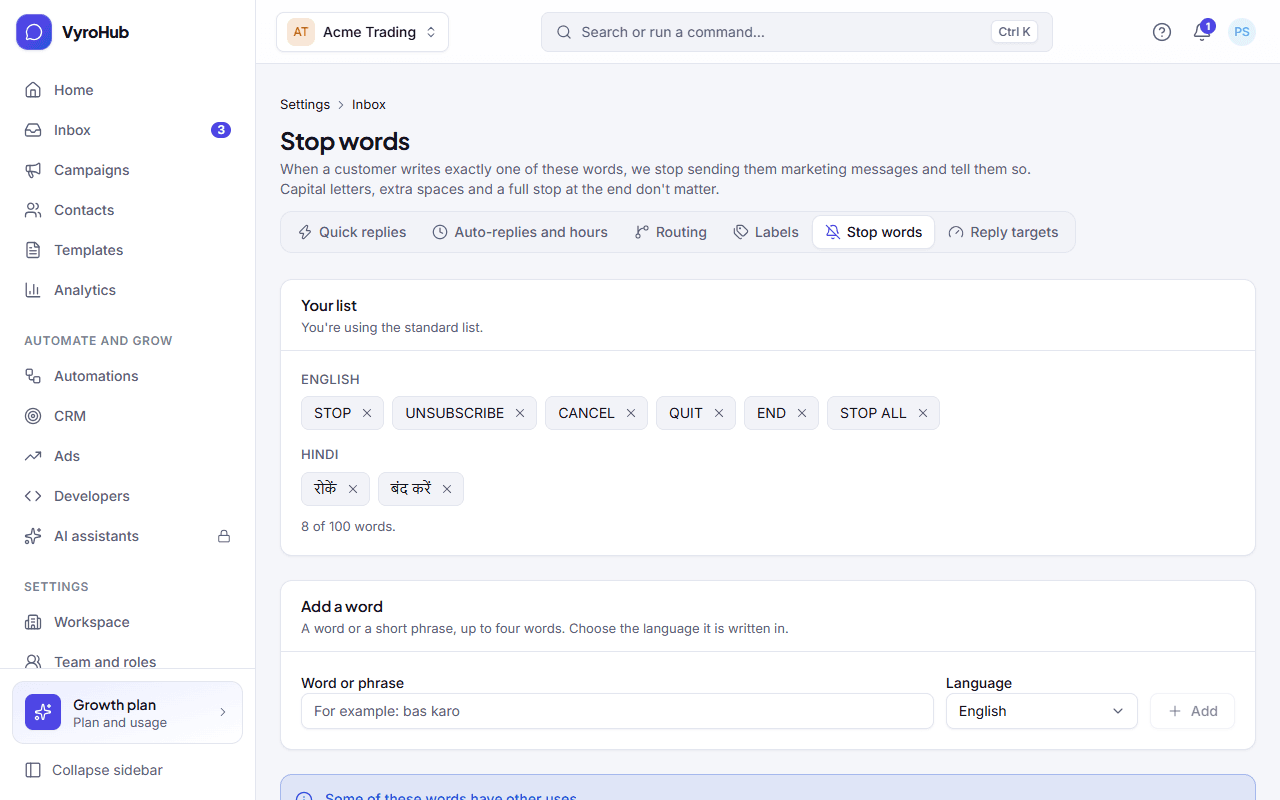
Go to Settings → Inbox settings → Stop words.
Under Add a word, type a word or a short phrase (up to four words, for example "bas karo") and choose the language it's written in.
Remove a word with the × next to it. Keep STOP: it's the word most customers know.
Choose Save changes. They apply to the next message a customer sends.
A message that only sounds like stopping
A message like "please stop sending these" isn't exactly a stop word, so nothing is switched off by itself. Instead the conversation shows "They may want fewer messages: Their last message sounds like a request to stop. Nothing is switched off until someone decides."
| Choose | What happens |
|---|---|
| Switch off marketing | They won't receive promotions. Replies and order updates still work. |
| It's not an opt-out | Nothing changes. |
You can also choose Flag as possible opt-out on any conversation yourself.
When it works
The stop word list shows "Stop words saved". A customer who writes a stop word shows on their contact as Do not message for marketing.
When something goes wrong
| What you see | Why | What to do |
|---|---|---|
| "Keep at least one stop word" | An empty list would mean nobody could stop. | Keep at least one word. |
| "STOP isn't in the list" | You removed STOP. | Add it back unless you have a reason not to. |
| "Some of these words have other uses" | A word like "end" may appear in normal messages. | Only an exact match counts, so this is usually fine. Review the list. |
| "Couldn't save the changes." | A short connection problem. | Try again. |
Limits
| Limit | Value | Set by |
|---|---|---|
| Stop words in a workspace | 100 | VyroHub |
| One stop word | Up to 4 words and 40 characters | VyroHub |
| What counts | The whole message must be the stop word | VyroHub |