Close your workspace
Ask to close the workspace, the 30-day waiting period, and how to change your mind.
PartialWorks, but a part is missing or not switched on yet. The page says which part.
Last reviewed against the app on
Closing a workspace deletes it and its data for good, after a waiting period in which you can change your mind.
What's partial: downloading a full copy of your workspace data before closing is not available yet. Contacts and campaign results can be exported from their own screens meanwhile.
Who can do this: Owner
Only an Owner can close the workspace. Everyone else sees 'Only Owners can do this.'
Steps
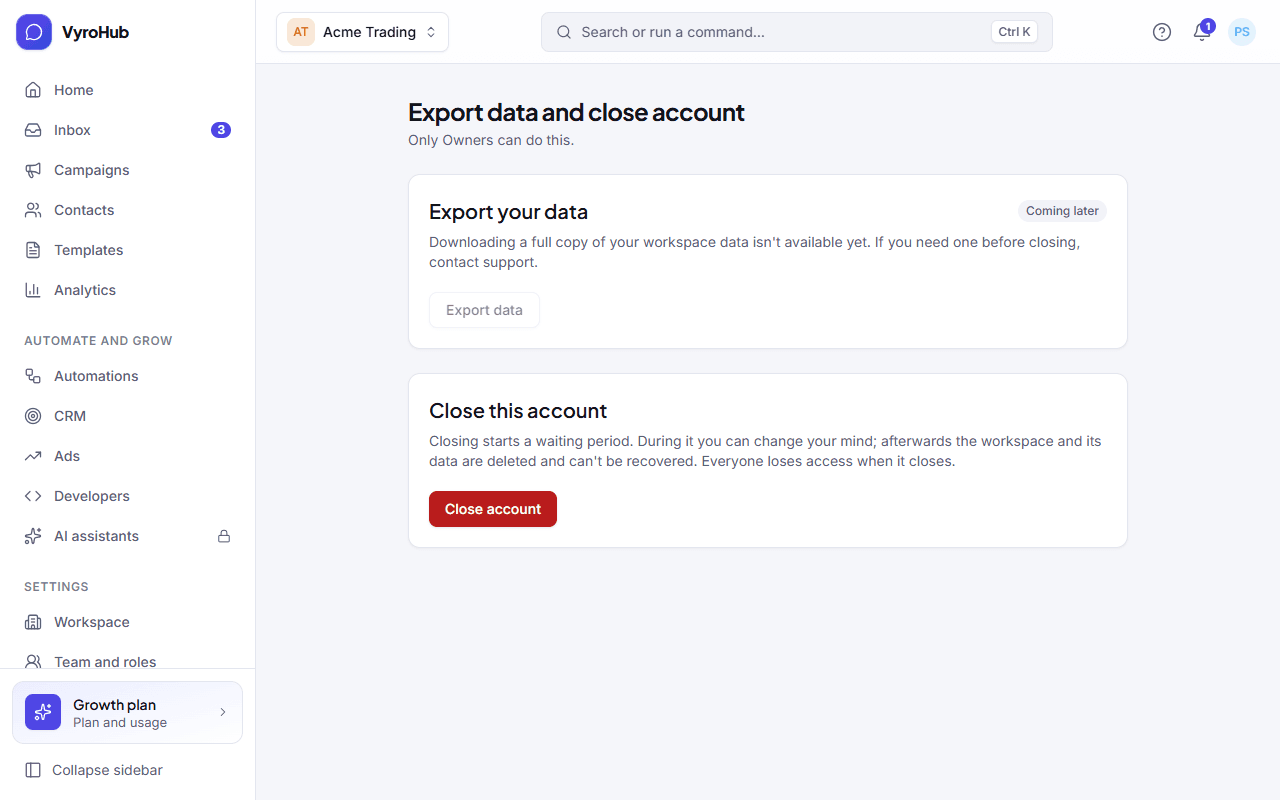
Go to Settings → Data export.
If you need your data, export it first: contacts and campaign results have their own export.
Under Close this account, choose Close account. Type your organisation's name to confirm.
Enter a code from your authenticator app. You see "Closure requested".
When it works
The page shows "Your account is scheduled to close" with the date and the days left. Until that date everything keeps working. On that date the workspace and its data are deleted and can't be recovered, and everyone loses access.
Change your mind
Before the closing date, open Settings → Data export and choose Keep my account. You see "Closure cancelled. Your account stays open." Nothing is deleted.
When something goes wrong
| What you see | Why | What to do |
|---|---|---|
| "Turn on two-step verification first." | Closing needs a code from your authenticator app. | Turn it on under Settings → Security. |
| "Closure already requested" | Someone already asked to close it. | Wait for the date, or choose Keep my account. |
| "Couldn't load your organization's name, which you need to confirm." | A short connection problem. | Refresh the page and try again. |
Limits
| Limit | Value | Set by |
|---|---|---|
| Waiting period before deletion | 30 days | VyroHub |
One download with a full copy of the workspace before you close it. Until then, contact support if you need one.