Your Home screen
What the Home screen shows, why two teammates can see different figures, and how to act on what needs attention.
ImplementedWorks in the app today, as this page describes.
Last reviewed against the app on
Home is the first screen after you sign in. It answers two questions: what needs me right now, and how is the week going.
Who can do this: Everyone
Each part only shows what your role can open. A figure you can't see is left out, never shown as zero. An Agent's message figures are their own.
What's on it
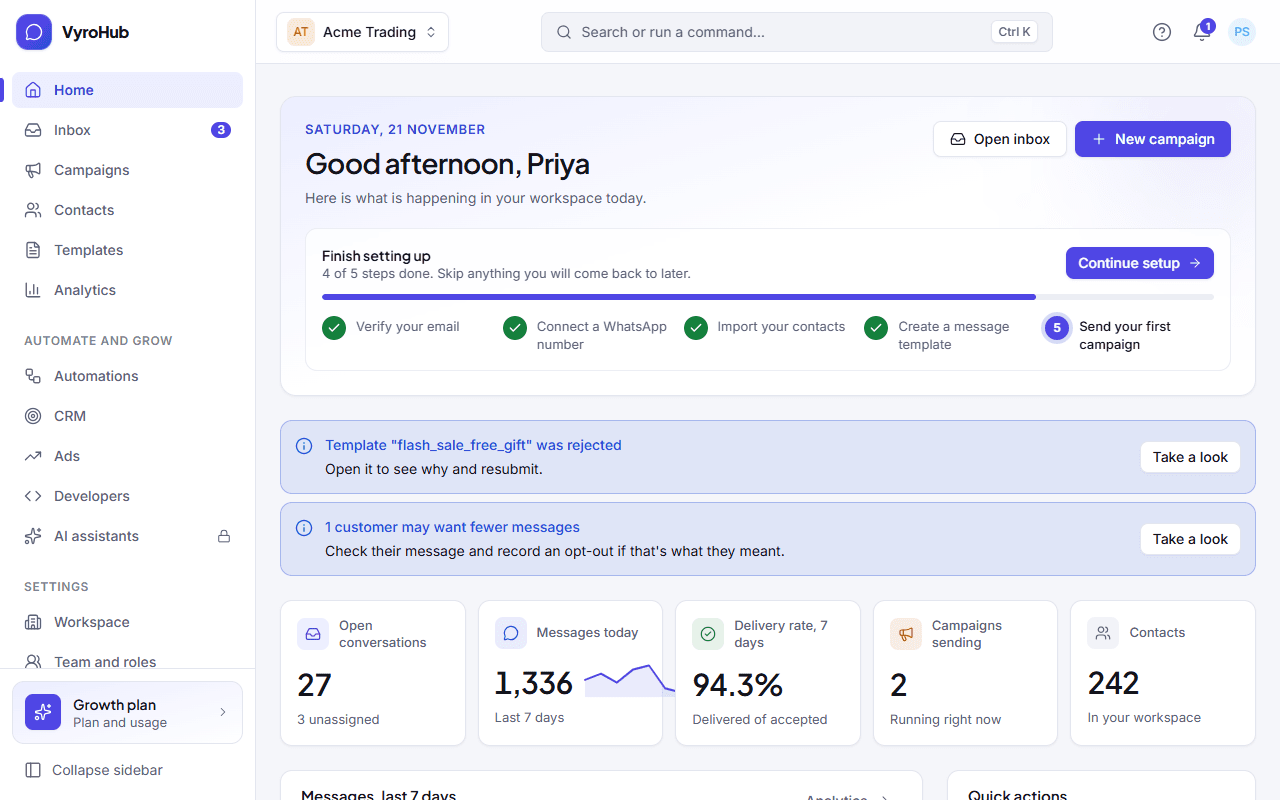
| Part | What it shows |
|---|---|
| Needs your attention | Up to 6 things to act on, each with a link: campaigns that were paused or held, contact imports with problems, templates WhatsApp rejected or paused, conversations waiting for someone to pick them up. |
| Open conversations | How many conversations are open, and how many of them are unassigned. |
| Messages today | Messages sent today. For an Agent: "Messages you sent today". |
| Delivery rate, 7 days | Delivered out of the messages WhatsApp accepted, over the last 7 days. |
| Campaigns sending | Campaigns running right now. |
| Messages, last 7 days | A bar per day, in your workspace's time zone. |
| Recent activity | Up to 8 recent things your team and VyroHub did, with See the full audit log. |
| Quick actions | Shortcuts: open the inbox, create a campaign, create a template, import contacts, connect a number, invite a teammate. |
Steps
Open Home from the sidebar.
Start with Needs your attention. Choose Take a look on an item to open the screen where you fix it.
Use the quick actions for the most common next steps.
When it works
A quiet day shows an empty Needs your attention box and up-to-date figures. A new workspace shows "No messages yet" in the chart until you send or receive your first message.
When something goes wrong
| What you see | Why | What to do |
|---|---|---|
| "We couldn't load your overview" | A short connection problem. | Choose retry. |
| A figure is missing | Your role can't open what it counts. | Nothing is wrong. Ask an Owner or Admin if you need it. |
| Your numbers differ from a teammate's | Agents see their own message figures; Owners, Admins and Managers see more. | Nothing is wrong. |
Limits
| Limit | Value | Set by |
|---|---|---|
| Items under "Needs your attention" | Up to 6 | VyroHub |
| Items under "Recent activity" | Up to 8 | VyroHub |
| Import problems shown | Imports from the last 7 days | VyroHub |