Number health and limits
What number health means, how the daily new-contact limit works, and how to keep both in good shape.
ImplementedWorks in the app today, as this page describes.
Last reviewed against the app on
WhatsApp watches how customers react to every number. If many people block or report your messages, WhatsApp lowers what the number may do. VyroHub shows you where each number stands, so you can act before that happens.
Who can do this: Owner, Admin, Manager
Steps
Go to Settings → WhatsApp numbers. Each number shows its health, its daily new-contact limit and how many it has used.
Choose View details on a number for the full picture: health, the limit's history, and what changed.
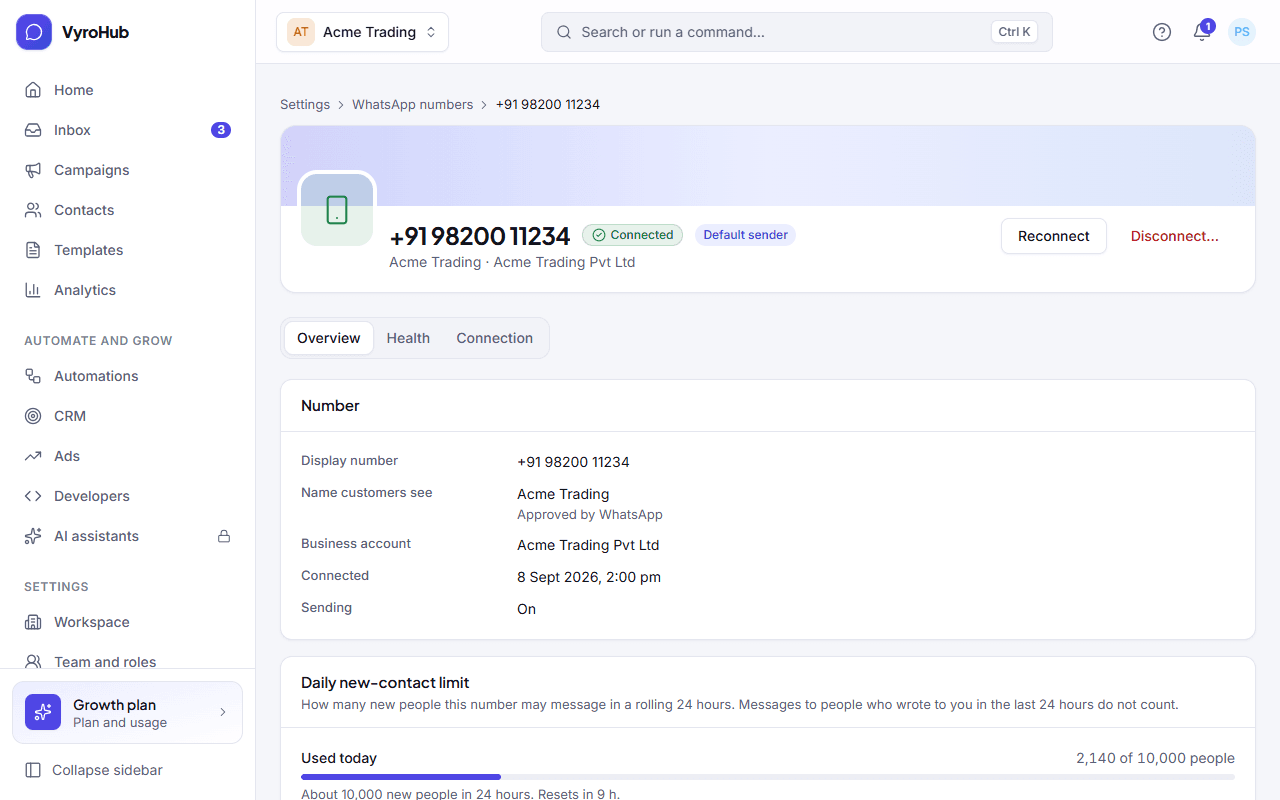
Number health
| Health | What it means | What to do |
|---|---|---|
| Good | Customers are reacting well to your messages. | Keep sending messages people expect, to people who asked for them. |
| Needs attention | More people than usual are blocking or reporting your messages. | Send fewer marketing messages to people who haven't replied in a while. Make templates say clearly why the person is getting them. |
| At risk | Many customers are blocking or reporting this number. WhatsApp may lower the daily limit or restrict the number. | Pause marketing campaigns, review your latest templates, and contact only people who asked to hear from you. |
| Not rated yet | WhatsApp hasn't rated the number yet. | Nothing. A rating appears after the first messages are sent. |
VyroHub protects your number for you
If a number's health drops while a campaign is running, VyroHub puts the campaign on hold instead of carrying on. See while a campaign sends.
Daily new-contact limit
This is how many new people one number may message in a rolling 24 hours. Messages to people who wrote to you in the last 24 hours don't count.
- The number card shows it as, for example, "About 1,000 new people in 24 hours", with Used today and when it resets.
- Daily limit over time shows the last 30 days. The limit rises as WhatsApp sees steady, high-quality sending.
- Campaigns check this limit before they send, and can send in stages when the audience is bigger. See pre-flight checks.
Other things on a number's page
| Item | What it tells you |
|---|---|
| Name customers see | The display name, and whether WhatsApp approved it ("Approved", "In review", or "Declined: choose another name in Meta Business Settings"). |
| Messages from WhatsApp | "Arriving normally", or "Nothing received for a while" if WhatsApp hasn't sent anything for a long time. |
| Access to your account | Whether VyroHub's access is fine, "Expires soon", or "Expired" or "Revoked" (reconnect needed). |
| Sending speed | How many messages a second the number can send. Campaigns are paced to stay within it. |
| Default sender | The number used when you don't pick one. |
When something goes wrong
| What you see | Why | What to do |
|---|---|---|
| "N numbers need attention" at the top of the list | A number has a problem listed below it. | Open the number and follow its message. |
| "Campaigns are on hold for this number" | The number's health dropped or it can't send. | Fix the cause, review the audience and templates, then resume the campaigns. |
| "Expired, reconnect needed" or "Revoked, reconnect needed" | VyroHub's access to the number ended. | Reconnect the number. |
| "Nothing received for a while" | No updates from WhatsApp for a long time. It can be normal on a quiet number. | If customers say they wrote and nothing arrived, contact support. |
| "We couldn't load the history" | A short connection problem. | Reload the page. History also needs a few days of sending first. |
Limits
| Limit | Value | Set by |
|---|---|---|
| Daily new-contact limit | Set per number, rises with good sending | |
| Limit history shown | Last 30 days | VyroHub |
| How often health is refreshed | About every 15 minutes | VyroHub |