Pre-flight checks
Every check a campaign passes before it can be sent, what each result means, and how sending in stages works.
ImplementedWorks in the app today, as this page describes.
Last reviewed against the app on
Before a campaign can go, VyroHub checks permission, the do-not-message list, your template, your number and your limits. Each check has a result:
| Result | Meaning |
|---|---|
| Passed | All good. |
| For your information | Worth knowing; doesn't stop sending. |
| Some people left out | Those people won't get the message; the rest will. |
| Warning | You can send, but read it first. |
| Blocks sending | Must be fixed before the campaign can be sent. |
The summary says Ready to send, Ready to send, with a few things to know, or N things to fix before this can be sent.
Who can do this: Owner, Admin, Manager
Steps
In the builder, go to Checks. The checks run by themselves ("Checking permission, the do-not-message list, your template, your number and your limits…").
Read each result. Use the link next to a problem (for example Open the template or Fix the number) to fix it.
Choose Run the checks again until nothing Blocks sending.
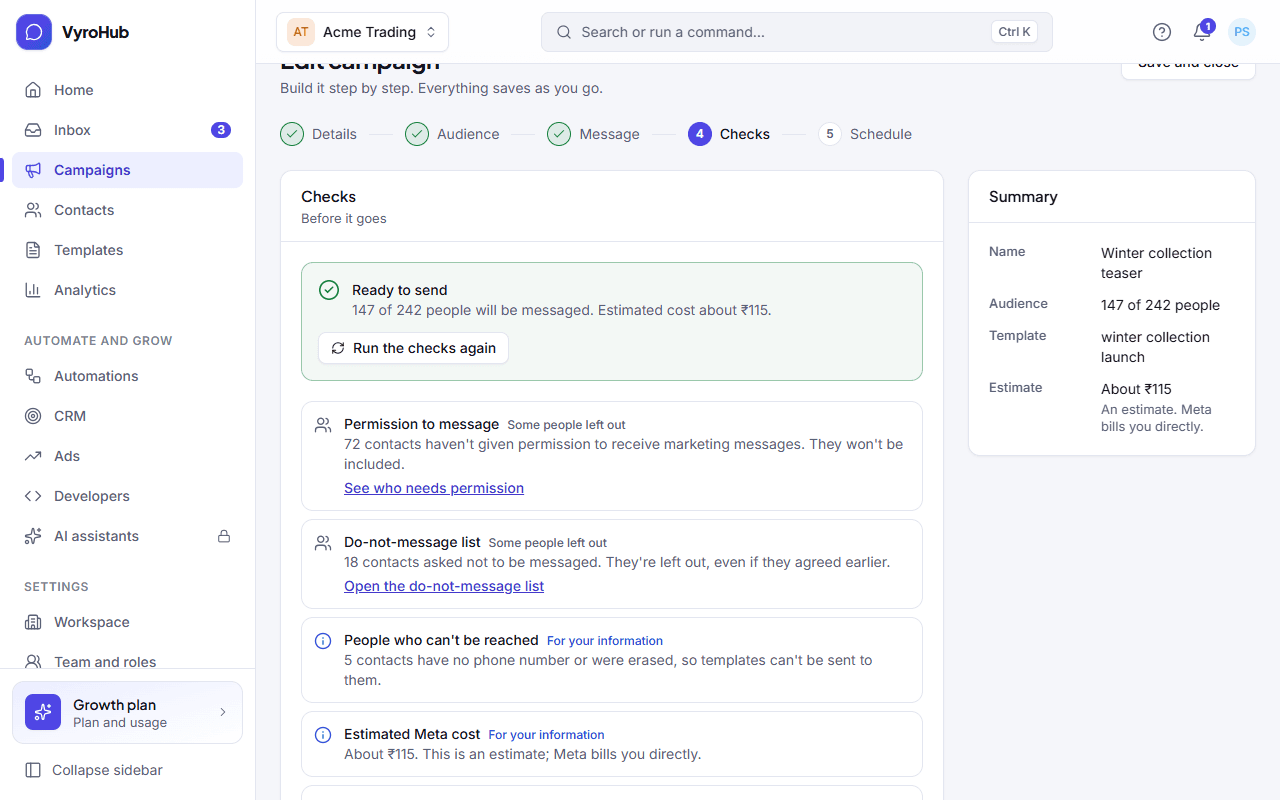
Every check
| Check | You may see | Result | What to do |
|---|---|---|---|
| Setup | "The campaign isn't finished: It still needs a name, a sending number, a template, an audience, a value for {{1}}…" | Blocks sending | Go back and finish it. |
| Setup | "Sending is switched off: Your workspace can't send messages right now" | Blocks sending | See billing. Usually an unpaid invoice. |
| Permission to message | "Everyone in this audience has agreed to receive these messages." | Passed | Nothing. |
| Permission to message | "N contacts haven't agreed to receive marketing messages. They won't be included." | Some people left out | See who needs permission to record it, if they really agreed. |
| Do-not-message list | "Nobody in this audience has asked to stop." | Passed | Nothing. |
| Do-not-message list | "N contacts asked not to be messaged. They're left out, even if they agreed earlier." | Some people left out | Nothing: this protects you. |
| People who can't be reached | "N contacts have no phone number or were erased, so templates can't be sent to them." | For your information | Nothing. |
| No one is left to message | "This audience is empty." or "Everyone in this audience is left out by the checks above." | Blocks sending | Collect permission first, or Choose another audience. |
| Template | "… is approved and can be sent." | Passed | Nothing. |
| Template | "Template can't be sent" (it isn't approved, or is paused or disabled) | Blocks sending | Open the template. |
| Template | "Campaigns can't send this template yet: it has a picture, video or document header / a value in its header / a button that takes a value" | Blocks sending | Choose another template: a plain-text one with values in its body. |
| Number | "Number health is Good" / "Number is connected" | Passed | Nothing. |
| Number | "Number health needs attention: Sending more may lower it." | Warning | Consider a smaller audience. |
| Number | "Number health is At risk: Customers have recently blocked or reported messages from this number." | Warning | Think twice: more could lead to a restriction. Read how to improve it. |
| Number | "The number can't send" | Blocks sending | Fix the number. |
| Number | "WhatsApp needs a payment method" (marketing only) | Blocks sending | Add a payment method in Meta's billing settings. |
| Daily limit | "Within your daily limit: You can message about N new people in the next 24 hours." | Passed | Nothing. |
| Daily limit | "Above your daily new-contact limit … Send in N stages of about M?" | Warning | Choose Send in stages (see below). |
| Daily limit | "Above your daily new-contact limit … Wait for the limit to reset." | Blocks sending | Wait, or send to fewer people. |
| Plan allowance | "Each message counts against your plan's allowance for the month as it is sent." | For your information | If the allowance runs out, the campaign is held and carries on once it is topped up. |
| Approval | "An Admin or Owner needs to approve this" | For your information | See approvals. |
Sending in stages
When more people can be messaged than your number's daily new-contact limit allows, VyroHub offers to send in stages: about one day's limit per stage.
- The first stage starts when you send.
- Each next stage starts at 10:00 the next day, in your workspace's time zone.
- The report shows which stage it's on.
Example: 2,400 people can be messaged and your number can reach about 1,000 new people a day. The check offers 3 stages of about 1,000. Stage 1 goes today, stage 2 tomorrow at 10:00, stage 3 the day after.
About cost
The checks show an estimated cost, or "Not available yet" when there is no price list to estimate from. Meta bills WhatsApp message charges to you directly; the estimate is only a guide. See usage and cost.
Limits
| Limit | Value | Set by |
|---|---|---|
| Daily new-contact limit | Per number | |
| Next stage of a staged campaign | 10:00 the next day, workspace time | VyroHub |
| Message allowance | Per month, shown on Settings → Billing and plan | Your plan |