Plan and usage
See your plan, how much of each limit you've used, what happens near and at a limit, and your next invoice.
PartialWorks, but a part is missing or not switched on yet. The page says which part.
Last reviewed against the app on
What's partial: plan prices are placeholders until plans are final. Campaign recipients a day and storage are plan limits, but the page doesn't show a meter for them yet.
Who can do this: Owner, Admin
Other roles see 'You can't see billing. Ask an Owner or Admin.'
Steps
Go to Settings → Billing and plan. The Plan and usage tab opens.
Read Your plan: its name and price ("a month, plus GST").
Read This period (from and to), and Next invoice ("About ₹… on …, Includes GST").
Check the usage meters against what your plan includes.
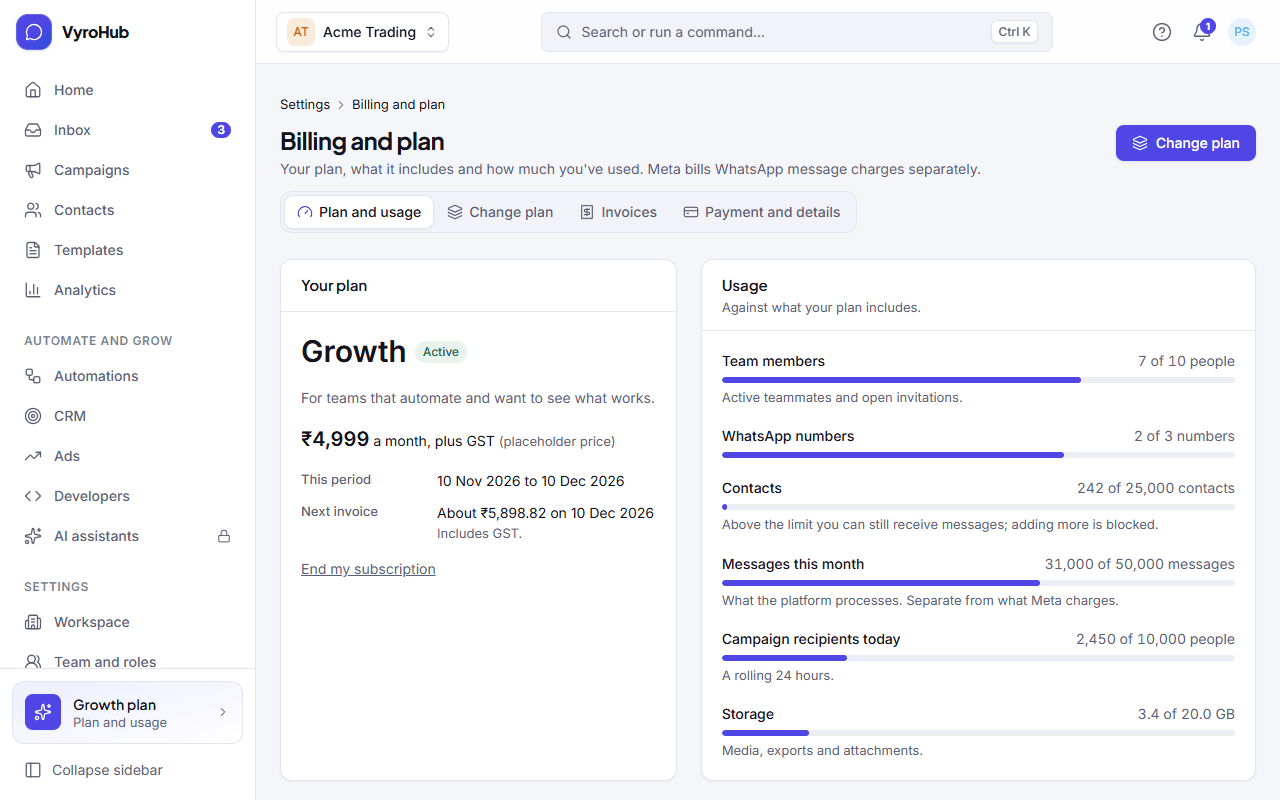
The usage meters
| Meter | Counts | How it's enforced |
|---|---|---|
| Team members | People in the workspace | Shown against your plan. Moving to a smaller plan waits until you're within its limit. |
| WhatsApp numbers | Connected numbers | Shown against your plan. Same rule for moving down. |
| Contacts | Contacts in your contact book | Shown against your plan. Same rule for moving down. |
| Messages a month | Messages processed in this billing period | Counted as each message is sent. Depending on your plan it either warns you, or stops: a running campaign is then held with "Your plan's message allowance is used up" and carries on once it's topped up. The meter says which. |
Each meter shows its state:
| State | Shown as |
|---|---|
| Below 80% | Normal |
| 80% or more | "You're close to a limit" |
| 100% | "You've reached a limit", with what to do. If you can't change the plan: "Ask the Owner to upgrade." |
Banners you may see here
| Banner | Meaning |
|---|---|
| "Your trial ends …" | Add a card so the first invoice can be paid. |
| "An invoice is N days overdue" | See missed payments. Open invoices to pay. |
| "Your subscription will end" / "Your subscription ends on …" | You ended it. Keep my plan undoes that. |
| "Moving to … on …" | A downgrade is scheduled. Cancel the change keeps your current plan. |
How WhatsApp messages are billed
The page repeats it: Meta bills you directly for WhatsApp messages ("See the estimate" opens usage and cost). Billing messages through us shows "Not available".
When it works
You see your plan, your period, your next invoice and every meter in its normal state.
When something goes wrong
| What you see | Why | What to do |
|---|---|---|
| "We couldn't load your plan" | A short connection problem. | Reload. |
| "You can't see billing" | Your role can't. | Ask an Owner or Admin. |
| "That didn't work. Try again." | A short connection problem. | Try again. |
Limits
| Limit | Value | Set by |
|---|---|---|
| Every meter's limit | Your plan | Your plan |
| "Close to a limit" warning | From 80% | VyroHub |
| Message allowance window | Your billing period | Your plan |
| Campaign recipients a day | A rolling 24 hours; stops at the limit | Your plan |
How billing worksPartial
The two bills you get, your plan and trial, billing periods, what your plan limits, and the life of a subscription from trial to renewal.
Change or cancel your planPartial
Upgrade straight away with a prorated charge, move down at the end of the period, end your subscription, and change your mind.