Change or cancel your plan
Upgrade straight away with a prorated charge, move down at the end of the period, end your subscription, and change your mind.
PartialWorks, but a part is missing or not switched on yet. The page says which part.
Last reviewed against the app on
What's partial: prices on this screen are placeholders ("Plans and prices are still being decided. The structure is real; the numbers will change before launch."), and an upgrade that needs a charge can't be paid until a payment provider is connected.
Who can do this: Owner
Admins can compare plans ('You can compare plans here. Ask the Owner to make the change.'). Changing the plan and ending the subscription need a code from your authenticator app.
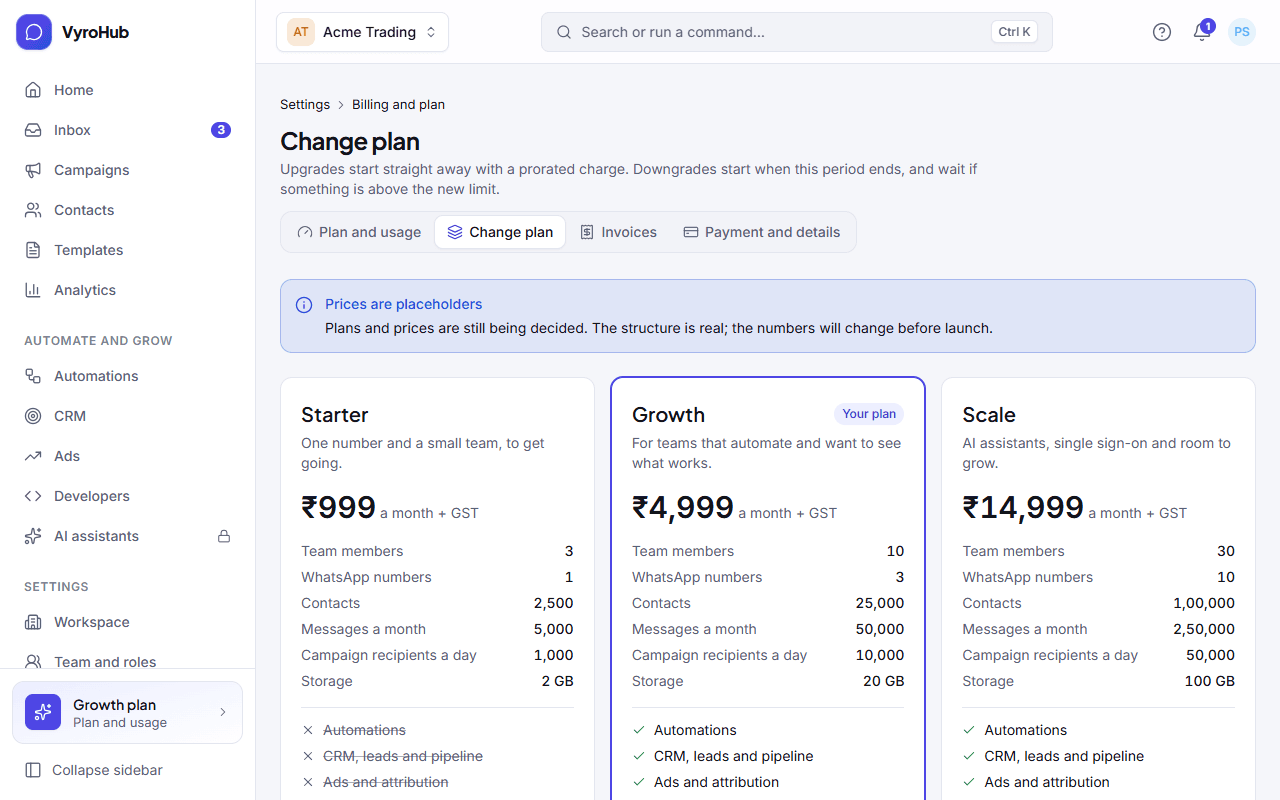
Upgrade or downgrade: what's different
| Upgrade (to a bigger plan) | Downgrade (to a smaller plan) | |
|---|---|---|
| When it starts | Straight away | When this period ends |
| Charge | A prorated charge now, for the rest of this period, plus GST | Nothing now; the next invoice is at the new price |
| Condition | The charge must go through, or nothing changes | Everything must be within the new plan's limits |
| During a trial | At once, no charge | At once, no charge |
Steps
Go to Settings → Billing and plan → Change plan.
Compare the plans: price, team members, WhatsApp numbers, messages a month, campaign recipients a day, storage, and features. Choose See what changes on the plan you want.
Read the preview: when it starts, What you'll pay now (with Total today), You gain and You lose.
Confirm: Pay ₹… and upgrade (upgrade) or Confirm the change (downgrade).
Enter a code from your authenticator app ("Confirm it's you").
When it works
- Upgrade: "You're on …: The new features are available now." An invoice for the prorated charge is issued.
- Downgrade: "Moving to … later: It starts on …". Plan and usage shows "Moving to … on …", with Cancel the change if you change your mind before then.
End your subscription
On Plan and usage, choose End my subscription.
Read End your subscription?: everything keeps working until the end of the period. After that sending stops, and your data is kept for 30 days so you can export it.
Choose End subscription and enter a code from your authenticator app.
Changed your mind? Until the period ends, choose Keep my plan: "Your plan carries on and renews on …".
Already ended? Choose a plan ("Pick a plan to keep your numbers, contacts and templates"). It starts a new period and is charged in full.
When something goes wrong
| What you see | Why | What to do |
|---|---|---|
| "Fix this first, then come back" (Reduce what is above the new plan's limits first.) | You're above the smaller plan's limits, for example more WhatsApp numbers or team members than it allows. | Reduce what's listed, then try again. |
| "Add a payment method first" | An upgrade must be charged and there's no card. | Add a card on Payment and details. |
| "No payment provider is set up." | Paying online isn't switched on yet. | Contact support. |
| "The payment didn't go through" | Your bank declined the charge. Nothing changed. | Try another card. |
| "We couldn't confirm the payment yet. Nothing is charged twice; check again soon." | The bank hasn't answered yet. | Wait a minute and check again. Don't pay twice. |
| "The workspace is suspended for a missed payment. Pay the invoice first." | You can't change plans while suspended. | Pay the overdue invoice. |
| "You're already on this plan." | Same plan chosen. | Pick another plan. |
| "That code didn't work. Try again." | Wrong or expired code. | Enter the next code. |
| "Only the Owner can change the plan" | Your role can't. | Ask the Owner. |
Limits
| Limit | Value | Set by |
|---|---|---|
| Upgrade | Starts at once; charged prorated now | VyroHub |
| Downgrade | Starts at period end; only within the new plan's limits | VyroHub |
| Data after the subscription ends | Kept 30 days for export | VyroHub |