Campaign reports
Compare your campaigns' delivery, read and reply rates, and see why messages failed.
ImplementedWorks in the app today, as this page describes.
Last reviewed against the app on
Who can do this: Owner, Admin, Manager
Steps
Go to Analytics → Campaign reports.
Choose the time range. Campaigns that started in that range are shown.
Compare them in the chart and the table, then open one for its full report.
What it shows
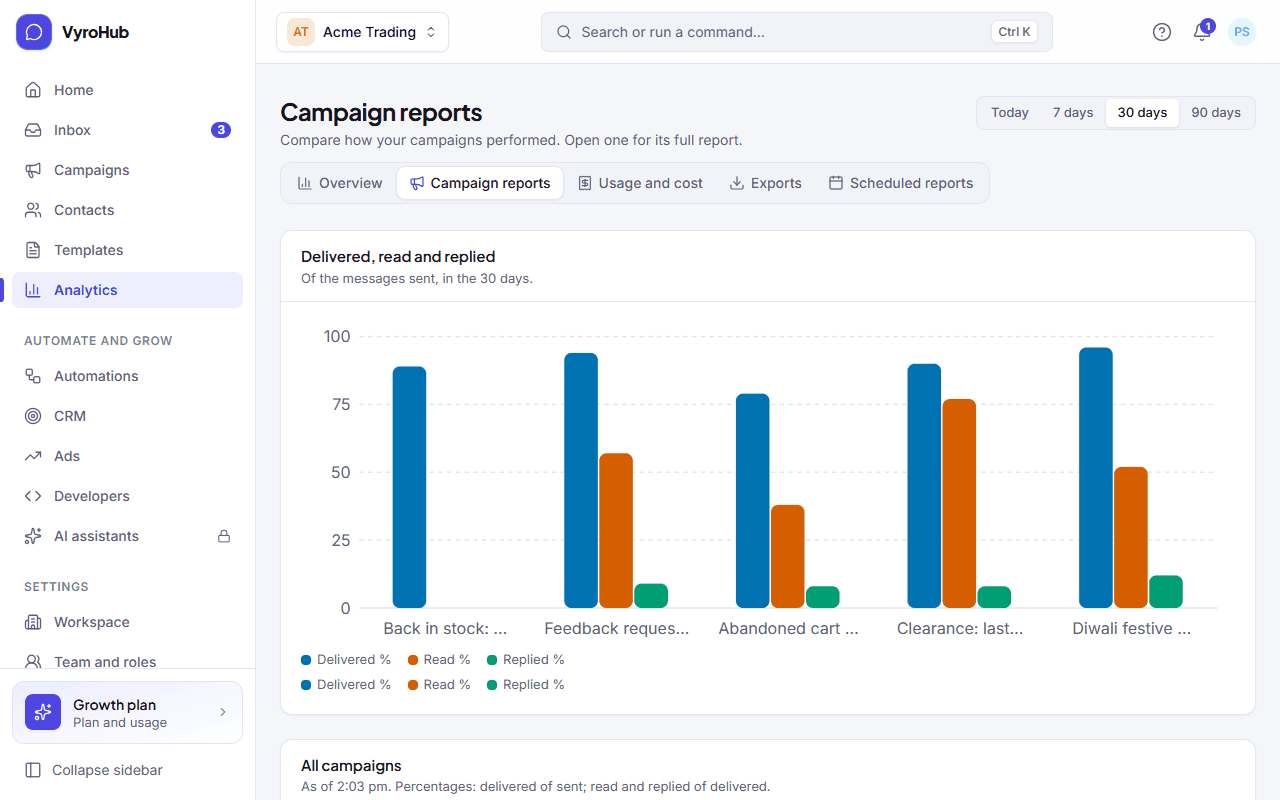
| Part | What it shows |
|---|---|
| Delivered, read and replied | A chart per campaign. Delivered is out of sent; read and replied are out of delivered. |
| Campaign results | A table of every campaign with its start time and rates. "As of" says when it was worked out. |
| Why messages failed | Failures across these campaigns, grouped by reason, marked Can be retried or Not retried. |
When it works
Each campaign that started in the range has a row. Open it to see its own results.
When something goes wrong
| What you see | Why | What to do |
|---|---|---|
| "No campaigns in this period" | None started in the chosen range. | Try a longer range. |
| "We couldn't load the reports" | A short connection problem. | Choose retry. |
| "You can't see campaign reports" | Your role can't. | Ask an Owner, Admin or Manager. |
Limits
| Limit | Value | Set by |
|---|---|---|
| Time ranges | 7, 30 or 90 days | VyroHub |